
It can happen at times that you may forget the management ip address of home wireless network router and wonder how to gain access to the console page of the router to make required changes.
I know I certainly did today and hence this post.
This also shows why to keep a detailed record of devices on your network and update the documentation with any of the network changes that have been made.
(I am not going to demonstrate the physical resetting of the router as that is to be kept as a last resort if other workarounds don’t get you what you want.)
There is this simple way to navigate to the management console page of any wireless router or other network infrastructure device recognized within Windows network.This works in Vista as well as Windows 7.
Go to Network and check if the wireless router is detected (mine is DIR-300 in this example).
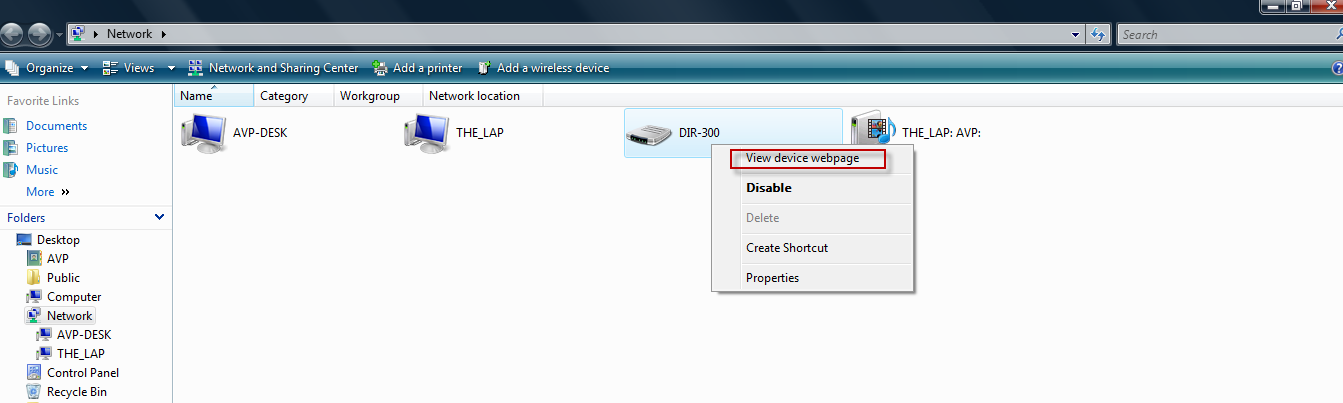
Just right click and select the option View device webpage.
It simply opens the management web page whose address you had forgotten.

All done.
>Just what I was lookin for!
Bless you,
Max
But how i can change the default “disable” option to “view device webpage” ? Thank you!