
Keeping antivirus utilities updated with newly released definition files as well as version upgrades is an important task for overall well being of the system.
It is useful to know a workaround if for some reason,one is not able to do this.In this case,manually updating definition files is needed.
The antivirus app used here is AVG.
Let’s take a look on how to manually update it with latest definition files.
1.Go to the AVG update web site.

2.Download the latest released updates and save them in a folder (here named as avgupdates)
3.Open AVG control center by double clicking the AVG tray icon,select Tools > Update from directory.
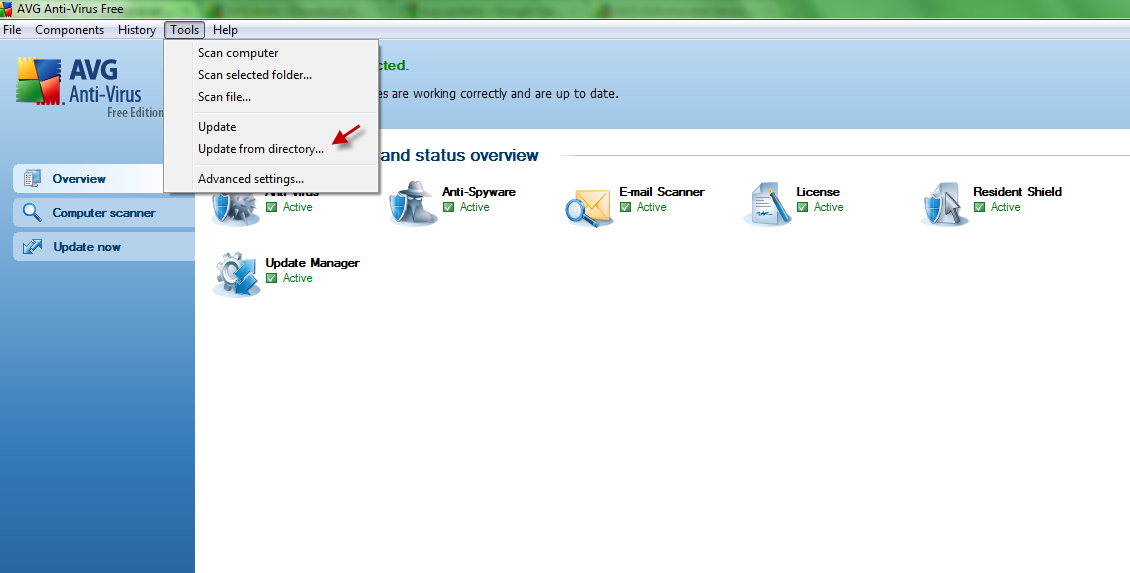
4.Point to the directory where updates have been manually downloaded (avgupdates).

All done.
I did once receive a “General Error” error message when trying to perform a version upgrade as well as the definition files and the above workaround resolved it.
Hope it helps you too.
Cheers.